Microsoft provided the most extensive look yet into the next version of the Mac version of its popular Office suite on Thursday at Macworld 2010. The new product, Microsoft Office for Mac 2011, will arrive in time for the 2010 holiday season.
Compatibility, collaborationMacworld spoke with several representatives of the company’s Mac Business Unit, who told us the company is focusing on three things with this new release: better compatibility across platforms, improved collaboration tools, and a more refined user interface. Also, as Microsoft announced last August, the suite will include Outlook for Mac, which replaces Entourage as Office’s e-mail client. And, in keeping with Microsoft’s 2008 promise, the new version of Office will offer renewed support for Visual Basic, which was dropped in the 2008 version of the productivity suite.
To the Mac Business Unit, compatibility means more than making sure that documents, spreadsheets, and presentations created on one platform open and render correctly on the other. Noting that roughly three quarters of their Mac users use Windows at least occasionally, Microsoft’s Mac team says it's also working to make the new Office for the Mac morefunctionally compatible with the Windows edition.
“Nowadays, compatibility means more than just file formats,” Microsoft’s Kurt Schmucker toldMacworld. “It’s also workflow, collaboration, and user interface.”
To that end, the new version of Office will incorporate document-collaboration features that take advantage of Microsoft's online storage features. With Office for Mac 2011, Mac users will be able to share files and collaborate on documents with other Mac and Windows users via Microsoft's SharePoint, SkyDrive, and Office Web Apps.
Those online tools will allow users to collaborate on documents with other Windows and Mac Office users in real time, much as you can in Google Docs now. You could, for example, create a document in Word on your laptop, save it to SkyDrive, then share it with others. A pop-up in Word will show you who’s working on the document; click on that list, and you’ll be able to send them a message (as long as everyone is using Outlook or Microsoft’s Messenger IM application). The paragraphs your collaborators are working on will be locked out until they’re done. You’ll also be able to edit those same documents from any computer, using Office’s Web apps. Mac users will have the same experience in the their versions of Safari and Firefox as Windows users get with their browsers, Schmucker said.
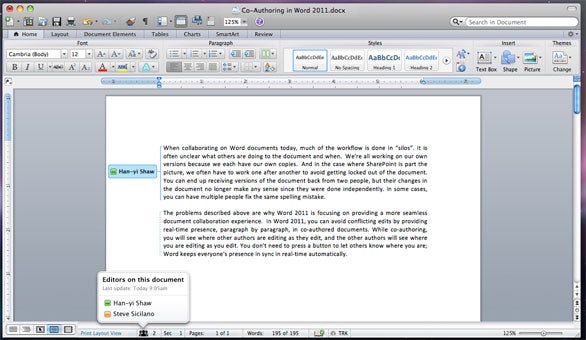
In this preview image from Word 2011, you can see the new Ribbon, a paragraph being edited by another user, and a list of all users editing the document.
Lessons learned
Microsoft also says it’s learned from user feedback about Office 2008 and has tweaked the user interface accordingly in Office 2011.
Most notably, there’s a new Ribbon at the top of each document window. (If you want a preview, check out Office for Windows; the ribbon is already in there, although the Microsoft Mac team members we spoke to said they had learned a lot from the criticism the Ribbon took when launched on Windows.) The Mac version of the Ribbon doesn’t replace any menu bars, but it does replace Office 2008’s controversial Elements Gallery, which took some fire from Mac users for its size and inflexibility. This new Ribbon is designed to give users quick access to each program's most commonly used tools. Unlike the Elements Gallery, the ribbon is customizable and, if you want more screen space, completely collapsible.
The new suite will also feel more Mac-like than Office 2008. For example, the Ribbon is built entirely using Apple’s Cocoa development framework, and takes takes advantage of Apple’s Core Animation system. (As a result, Ribbon tabs will slide smoothly when you rearrange them.) If you click on some Ribbon tools, they will expand smoothly into popovers that don’t obscure the document you’re working on. We even spied a non-modal search box on the right side of the toolbar, right where you’d expect it to be, allowing you to quickly search through documents without having your content blocked by a floating box.

A closer look at the new Ribbon in Office for Mac 2011.
Summarizing the interface changes, Microsoft's Han-Yi Shaw likened Office 2008 to a teenager—“a little quirky”—but said the new edition is Office matured. “This is the version that everyone wanted,” he said.
Shaw added that the Mac team at Microsoft worked hard to adopt Apple technologies while also making sure their product was recognizably Microsoft Office. “We’re at a cross-section of Mac and PC, and because we’re die-hard Mac users, we look at the [Office] technology and try to translate it,” he said. “Following the Apple design philosophy really takes you in the right direction.”
Outlook and Visual Basic
The other big news in Office 2011 is the demise of Entourage and the return of Outlook.
The new Outlook will support PST imports (allowing you to move an Outlook installation, including all your old e-mails, from a Windows PC to a Mac). It will also support Microsoft’s Information Rights Management (IRM), which allows senders to specify what recipients can do with messages (print, forward, and so on). Previously-Windows only, IRM is required in some corporate settings. IRM support in Office 2011 is aimed at Mac users in cross-platform environments, Schmucker said: “It’s been a blocker for some companies because the Mac support was not there.”
And Microsoft has re-engineered the Outlook message database system to be a series of small files, so it’s more easily backed up with Time Machine and searched in Spotlight. “Outlook’s new database is more reliable, faster, and fully supports Time Machine and Spotlight,” Schmucker said.
Finally, power users will be glad to see the return of the Visual Basic macro language. Visual Basic was dropped from Office 2008 in part because it was too technically difficult to port it to the Mac’s then-new Intel CPUs. Microsoft says it began work on that port as far back as 2008—before the last Mac Office shipped. That work is now complete. And the Mac suite will be using the most up-to-date version of Visual Basic, so it’ll be much more compatible with Office for Windows than the Visual Basic in previous versions of Office for Mac.
Compatibility, collaborationMacworld spoke with several representatives of the company’s Mac Business Unit, who told us the company is focusing on three things with this new release: better compatibility across platforms, improved collaboration tools, and a more refined user interface. Also, as Microsoft announced last August, the suite will include Outlook for Mac, which replaces Entourage as Office’s e-mail client. And, in keeping with Microsoft’s 2008 promise, the new version of Office will offer renewed support for Visual Basic, which was dropped in the 2008 version of the productivity suite.
To the Mac Business Unit, compatibility means more than making sure that documents, spreadsheets, and presentations created on one platform open and render correctly on the other. Noting that roughly three quarters of their Mac users use Windows at least occasionally, Microsoft’s Mac team says it's also working to make the new Office for the Mac morefunctionally compatible with the Windows edition.
“Nowadays, compatibility means more than just file formats,” Microsoft’s Kurt Schmucker toldMacworld. “It’s also workflow, collaboration, and user interface.”
To that end, the new version of Office will incorporate document-collaboration features that take advantage of Microsoft's online storage features. With Office for Mac 2011, Mac users will be able to share files and collaborate on documents with other Mac and Windows users via Microsoft's SharePoint, SkyDrive, and Office Web Apps.
Those online tools will allow users to collaborate on documents with other Windows and Mac Office users in real time, much as you can in Google Docs now. You could, for example, create a document in Word on your laptop, save it to SkyDrive, then share it with others. A pop-up in Word will show you who’s working on the document; click on that list, and you’ll be able to send them a message (as long as everyone is using Outlook or Microsoft’s Messenger IM application). The paragraphs your collaborators are working on will be locked out until they’re done. You’ll also be able to edit those same documents from any computer, using Office’s Web apps. Mac users will have the same experience in the their versions of Safari and Firefox as Windows users get with their browsers, Schmucker said.
In this preview image from Word 2011, you can see the new Ribbon, a paragraph being edited by another user, and a list of all users editing the document.
Lessons learned
Microsoft also says it’s learned from user feedback about Office 2008 and has tweaked the user interface accordingly in Office 2011.Most notably, there’s a new Ribbon at the top of each document window. (If you want a preview, check out Office for Windows; the ribbon is already in there, although the Microsoft Mac team members we spoke to said they had learned a lot from the criticism the Ribbon took when launched on Windows.) The Mac version of the Ribbon doesn’t replace any menu bars, but it does replace Office 2008’s controversial Elements Gallery, which took some fire from Mac users for its size and inflexibility. This new Ribbon is designed to give users quick access to each program's most commonly used tools. Unlike the Elements Gallery, the ribbon is customizable and, if you want more screen space, completely collapsible.
The new suite will also feel more Mac-like than Office 2008. For example, the Ribbon is built entirely using Apple’s Cocoa development framework, and takes takes advantage of Apple’s Core Animation system. (As a result, Ribbon tabs will slide smoothly when you rearrange them.) If you click on some Ribbon tools, they will expand smoothly into popovers that don’t obscure the document you’re working on. We even spied a non-modal search box on the right side of the toolbar, right where you’d expect it to be, allowing you to quickly search through documents without having your content blocked by a floating box.
A closer look at the new Ribbon in Office for Mac 2011.
Summarizing the interface changes, Microsoft's Han-Yi Shaw likened Office 2008 to a teenager—“a little quirky”—but said the new edition is Office matured. “This is the version that everyone wanted,” he said.
Shaw added that the Mac team at Microsoft worked hard to adopt Apple technologies while also making sure their product was recognizably Microsoft Office. “We’re at a cross-section of Mac and PC, and because we’re die-hard Mac users, we look at the [Office] technology and try to translate it,” he said. “Following the Apple design philosophy really takes you in the right direction.”
Outlook and Visual Basic
The other big news in Office 2011 is the demise of Entourage and the return of Outlook.The new Outlook will support PST imports (allowing you to move an Outlook installation, including all your old e-mails, from a Windows PC to a Mac). It will also support Microsoft’s Information Rights Management (IRM), which allows senders to specify what recipients can do with messages (print, forward, and so on). Previously-Windows only, IRM is required in some corporate settings. IRM support in Office 2011 is aimed at Mac users in cross-platform environments, Schmucker said: “It’s been a blocker for some companies because the Mac support was not there.”
And Microsoft has re-engineered the Outlook message database system to be a series of small files, so it’s more easily backed up with Time Machine and searched in Spotlight. “Outlook’s new database is more reliable, faster, and fully supports Time Machine and Spotlight,” Schmucker said.
Finally, power users will be glad to see the return of the Visual Basic macro language. Visual Basic was dropped from Office 2008 in part because it was too technically difficult to port it to the Mac’s then-new Intel CPUs. Microsoft says it began work on that port as far back as 2008—before the last Mac Office shipped. That work is now complete. And the Mac suite will be using the most up-to-date version of Visual Basic, so it’ll be much more compatible with Office for Windows than the Visual Basic in previous versions of Office for Mac.
Key improvements: compatibility, collaboration, and user interface.
Microsoft provided the most extensive look yet into the next version of the Mac version of its popular Office suite on Thursday at Macworld 2010. The new product, Microsoft Office for Mac 2011, will arrive in time for the 2010 holiday season.
Macworld spoke with several representatives of the company’s Mac Business Unit, who told us the company is focusing on three things with this new release: better compatibility across platforms, improved collaboration tools, and a more refined user interface. Also, as Microsoft announced last August, the suite will include Outlook for Mac, which replaces Entourage as Office’s e-mail client. And, in keeping with Microsoft’s 2008 promise, the new version of Office will offer renewed support for Visual Basic, which was dropped in the 2008 version of the productivity suite.
“Nowadays, compatibility means more than just file formats,” Microsoft’s Kurt Schmucker toldMacworld. “It’s also workflow, collaboration, and user interface.”
To that end, the new version of Office will incorporate document-collaboration features that take advantage of Microsoft's online storage features. With Office for Mac 2011, Mac users will be able to share files and collaborate on documents with other Mac and Windows users via Microsoft's SharePoint, SkyDrive, and Office Web Apps.
Those online tools will allow users to collaborate on documents with other Windows and Mac Office users in real time, much as you can in Google Docs now. You could, for example, create a document in Word on your laptop, save it to SkyDrive, then share it with others. A pop-up in Word will show you who’s working on the document; click on that list, and you’ll be able to send them a message (as long as everyone is using Outlook or Microsoft’s Messenger IM application). The paragraphs your collaborators are working on will be locked out until they’re done. You’ll also be able to edit those same documents from any computer, using Office’s Web apps. Mac users will have the same experience in the their versions of Safari and Firefox as Windows users get with their browsers, Schmucker said.
In this preview image from Word 2011, you can see the new Ribbon, a paragraph being edited by another user, and a list of all users editing the document.
Most notably, there’s a new Ribbon at the top of each document window. (If you want a preview, check out Office for Windows; the ribbon is already in there, although the Microsoft Mac team members we spoke to said they had learned a lot from the criticism the Ribbon took when launched on Windows.) The Mac version of the Ribbon doesn’t replace any menu bars, but it does replace Office 2008’s controversial Elements Gallery, which took some fire from Mac users for its size and inflexibility. This new Ribbon is designed to give users quick access to each program's most commonly used tools. Unlike the Elements Gallery, the ribbon is customizable and, if you want more screen space, completely collapsible.
The new suite will also feel more Mac-like than Office 2008. For example, the Ribbon is built entirely using Apple’s Cocoa development framework, and takes takes advantage of Apple’s Core Animation system. (As a result, Ribbon tabs will slide smoothly when you rearrange them.) If you click on some Ribbon tools, they will expand smoothly into popovers that don’t obscure the document you’re working on. We even spied a non-modal search box on the right side of the toolbar, right where you’d expect it to be, allowing you to quickly search through documents without having your content blocked by a floating box.
A closer look at the new Ribbon in Office for Mac 2011.
Summarizing the interface changes, Microsoft's Han-Yi Shaw likened Office 2008 to a teenager—“a little quirky”—but said the new edition is Office matured. “This is the version that everyone wanted,” he said.
Shaw added that the Mac team at Microsoft worked hard to adopt Apple technologies while also making sure their product was recognizably Microsoft Office. “We’re at a cross-section of Mac and PC, and because we’re die-hard Mac users, we look at the [Office] technology and try to translate it,” he said. “Following the Apple design philosophy really takes you in the right direction.”
The new Outlook will support PST imports (allowing you to move an Outlook installation, including all your old e-mails, from a Windows PC to a Mac). It will also support Microsoft’s Information Rights Management (IRM), which allows senders to specify what recipients can do with messages (print, forward, and so on). Previously-Windows only, IRM is required in some corporate settings. IRM support in Office 2011 is aimed at Mac users in cross-platform environments, Schmucker said: “It’s been a blocker for some companies because the Mac support was not there.”
And Microsoft has re-engineered the Outlook message database system to be a series of small files, so it’s more easily backed up with Time Machine and searched in Spotlight. “Outlook’s new database is more reliable, faster, and fully supports Time Machine and Spotlight,” Schmucker said.
Finally, power users will be glad to see the return of the Visual Basic macro language. Visual Basic was dropped from Office 2008 in part because it was too technically difficult to port it to the Mac’s then-new Intel CPUs. Microsoft says it began work on that port as far back as 2008—before the last Mac Office shipped. That work is now complete. And the Mac suite will be using the most up-to-date version of Visual Basic, so it’ll be much more compatible with Office for Windows than the Visual Basic in previous versions of Office for Mac.
Macworld spoke with several representatives of the company’s Mac Business Unit, who told us the company is focusing on three things with this new release: better compatibility across platforms, improved collaboration tools, and a more refined user interface. Also, as Microsoft announced last August, the suite will include Outlook for Mac, which replaces Entourage as Office’s e-mail client. And, in keeping with Microsoft’s 2008 promise, the new version of Office will offer renewed support for Visual Basic, which was dropped in the 2008 version of the productivity suite.
Compatibility, collaboration
To the Mac Business Unit, compatibility means more than making sure that documents, spreadsheets, and presentations created on one platform open and render correctly on the other. Noting that roughly three quarters of their Mac users use Windows at least occasionally, Microsoft’s Mac team says it's also working to make the new Office for the Mac morefunctionally compatible with the Windows edition.“Nowadays, compatibility means more than just file formats,” Microsoft’s Kurt Schmucker toldMacworld. “It’s also workflow, collaboration, and user interface.”
To that end, the new version of Office will incorporate document-collaboration features that take advantage of Microsoft's online storage features. With Office for Mac 2011, Mac users will be able to share files and collaborate on documents with other Mac and Windows users via Microsoft's SharePoint, SkyDrive, and Office Web Apps.
Those online tools will allow users to collaborate on documents with other Windows and Mac Office users in real time, much as you can in Google Docs now. You could, for example, create a document in Word on your laptop, save it to SkyDrive, then share it with others. A pop-up in Word will show you who’s working on the document; click on that list, and you’ll be able to send them a message (as long as everyone is using Outlook or Microsoft’s Messenger IM application). The paragraphs your collaborators are working on will be locked out until they’re done. You’ll also be able to edit those same documents from any computer, using Office’s Web apps. Mac users will have the same experience in the their versions of Safari and Firefox as Windows users get with their browsers, Schmucker said.
In this preview image from Word 2011, you can see the new Ribbon, a paragraph being edited by another user, and a list of all users editing the document.
Lessons learned
Microsoft also says it’s learned from user feedback about Office 2008 and has tweaked the user interface accordingly in Office 2011.Most notably, there’s a new Ribbon at the top of each document window. (If you want a preview, check out Office for Windows; the ribbon is already in there, although the Microsoft Mac team members we spoke to said they had learned a lot from the criticism the Ribbon took when launched on Windows.) The Mac version of the Ribbon doesn’t replace any menu bars, but it does replace Office 2008’s controversial Elements Gallery, which took some fire from Mac users for its size and inflexibility. This new Ribbon is designed to give users quick access to each program's most commonly used tools. Unlike the Elements Gallery, the ribbon is customizable and, if you want more screen space, completely collapsible.
The new suite will also feel more Mac-like than Office 2008. For example, the Ribbon is built entirely using Apple’s Cocoa development framework, and takes takes advantage of Apple’s Core Animation system. (As a result, Ribbon tabs will slide smoothly when you rearrange them.) If you click on some Ribbon tools, they will expand smoothly into popovers that don’t obscure the document you’re working on. We even spied a non-modal search box on the right side of the toolbar, right where you’d expect it to be, allowing you to quickly search through documents without having your content blocked by a floating box.
A closer look at the new Ribbon in Office for Mac 2011.
Summarizing the interface changes, Microsoft's Han-Yi Shaw likened Office 2008 to a teenager—“a little quirky”—but said the new edition is Office matured. “This is the version that everyone wanted,” he said.
Shaw added that the Mac team at Microsoft worked hard to adopt Apple technologies while also making sure their product was recognizably Microsoft Office. “We’re at a cross-section of Mac and PC, and because we’re die-hard Mac users, we look at the [Office] technology and try to translate it,” he said. “Following the Apple design philosophy really takes you in the right direction.”
Outlook and Visual Basic
The other big news in Office 2011 is the demise of Entourage and the return of Outlook.The new Outlook will support PST imports (allowing you to move an Outlook installation, including all your old e-mails, from a Windows PC to a Mac). It will also support Microsoft’s Information Rights Management (IRM), which allows senders to specify what recipients can do with messages (print, forward, and so on). Previously-Windows only, IRM is required in some corporate settings. IRM support in Office 2011 is aimed at Mac users in cross-platform environments, Schmucker said: “It’s been a blocker for some companies because the Mac support was not there.”
And Microsoft has re-engineered the Outlook message database system to be a series of small files, so it’s more easily backed up with Time Machine and searched in Spotlight. “Outlook’s new database is more reliable, faster, and fully supports Time Machine and Spotlight,” Schmucker said.
Finally, power users will be glad to see the return of the Visual Basic macro language. Visual Basic was dropped from Office 2008 in part because it was too technically difficult to port it to the Mac’s then-new Intel CPUs. Microsoft says it began work on that port as far back as 2008—before the last Mac Office shipped. That work is now complete. And the Mac suite will be using the most up-to-date version of Visual Basic, so it’ll be much more compatible with Office for Windows than the Visual Basic in previous versions of Office for Mac.